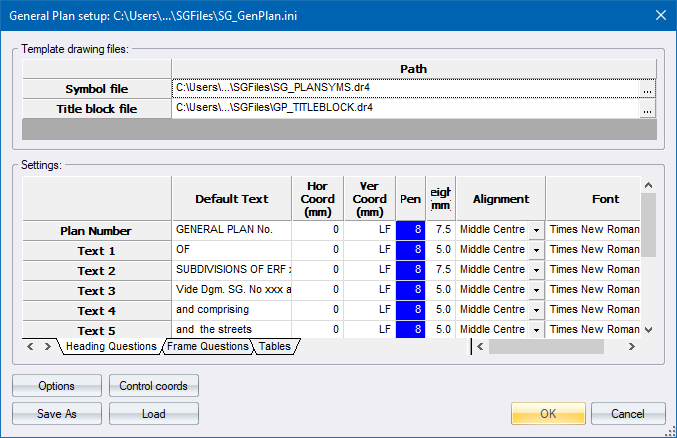
Specify options for the General Plan.
|
Option
|
Description |
|
Template drawing files |
|
|
Symbol file drg |
Specify the drawing file that contains the symbols used in the General Plan. Click ... to display the standard file open window. |
|
Title block drg |
Specify the drawing file that contains the title block drawing for the General Plan. Click ... to display the standard file open window. |
|
Settings |
You can specify the default text value and the attributes of heading questions, frame questions and the table data. |
|
Options |
Click to display the General Plan Options where you can specify layer names and other settings. |
|
Control coords |
Click to display the Control Coordinates. |
|
Save As |
Click to save the current settings. |
|
Load |
Click to load a General Plan settings file. |
You can specify the default text value and the attributes of heading questions, frame questions and the table data.
|
Option
|
Description |
|
Default Text |
Specify the default text for the text item. |
|
Hor Coord |
Specify the horizontal coordinate in mm on paper for the text item. |
|
Ver Coord |
Specify the vertical coordinate in mm on paper for the text item. A code of "LF" will apply a line feed of 1.67 x text height. |
|
Pen |
Specify the pen of the text item. |
|
Height |
Specify the text height in mm of the text item. |
|
Alignment |
Specify the alignment of the text |
|
Font |
Specify the font of the text item. |
|
Underline |
Select this checkbox to underline the text item. |