Icon
Command
Menu
Toolbar

TK_SURVEYSTREETNUM
Toolkit
Survey
Insert street numbers.
|
Icon |
Command |
Menu |
Toolbar |
|
|
TK_SURVEYSTREETNUM |
Toolkit |
Survey |
This function allows you to place street numbers, either horizontally or perpendicular to the boundary, at a specified offset from the boundary line.
Procedure
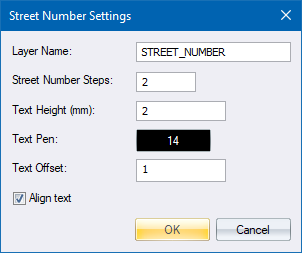
Set the parameters and click OK to continue.
Indicate boundary for street number, on correct side of line
Click next to a boundary line in the road reserve to position the street number.

Type in a street number and press [Enter] or click Enter  . The street number will be added to the drawing.
Indicate boundary for street number, or correct side of line
