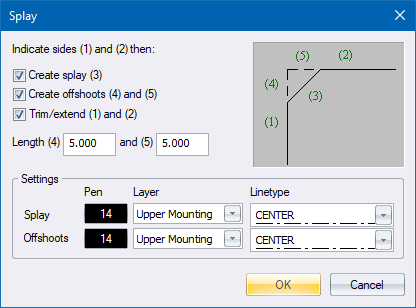
Set up how the splay must be drawn using this window. The splay is created by indicating sides (1) and (2).
|
Option
|
Description |
|
Create splay (3) |
Select this checkbox to create the splay line shown as (3) in the illustration. |
|
Create offshoots (4) and (5) |
Select this checkbox to create the offshoots shown as (4) and (5) in the illustration. |
|
Trim/extend (1) and (2) |
Select this checkbox to trim or extend the original lines (1) and (2) to the splay start and end points. |
|
Length (4) |
Specify a length for offshoot (4). This determines the distance between the intersection point and the end of line (1). |
|
Length (5) |
Specify a length for offshoot (5). This determines the distance between the intersection point and the end of line (2). |
|
Settings |
|
|
Splay Pen |
Select the pen for the splay line. |
|
Splay Layer |
Select the layer for the splay. |
|
Splay Line type |
Select the line type for the splay line. |
|
Offshoots Pen |
Select the pen for the offshoots lines. |
|
Offshoots Layer |
Select the layer for the offshoots lines. |
|
Offshoots Line type |
Select the line type for the offshoots lines. |