Icon
Command
Menu
Toolbar

TK_STRUCTURALSECTIONS
Toolkit
Structural
Draw structural steel sections.
|
Icon |
Command |
Menu |
Toolbar |
|
|
TK_STRUCTURALSECTIONS |
Toolkit |
Structural |
This function allows you to draw the profiles of structural steel members. The following sections are supported:
|
Hot Rolled
|
||
|
I Sections
|
||
|
Parallel |
|
|
|
Tapered |
|
|
|
H Sections
|
||
|
Standard |
|
|
|
Piles |
|
|
|
Channel Sections
|
||
|
DIN Taper flange |
|
|
|
BS Taper flange |
|
|
|
SA Parallel flange |
|
|
|
Angle Sections
|
||
|
Equal |
|
|
|
Unequal |
|
|
|
Cold Rolled
|
||
|
Angle Sections
|
||
|
Equal angle |
|
|
|
Unequal angle |
|
|
|
Lipped channel |
|
|
|
Channel Sections
|
||
|
Standard |
|
|
|
Lipped channel |
|
|
|
Zeds
|
||
|
Equal lipped |
|
|
|
Unequal lipped |
|
|
|
Top Hats |
|
|
Procedure
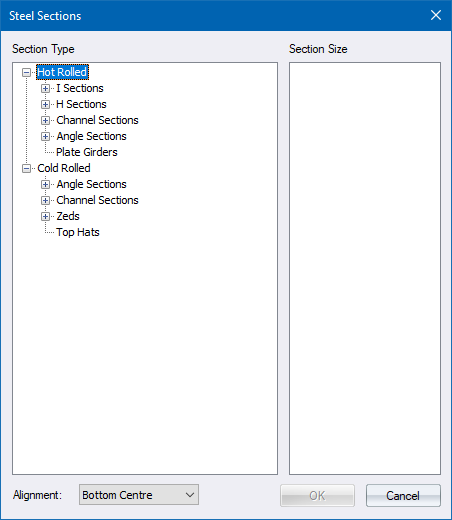
Select the type of section you want to draw. In this instance you select a Parallel I section.
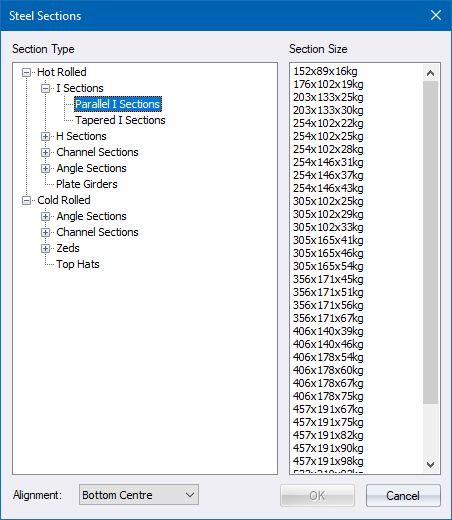
Select a suitable size and click OK.
Indicate position of steel section

The section is drawn in the current line style and pen.